
Why Revenue Recognition in Spreadsheets Is a Bad Idea

If you have ever rebuilt a deferred revenue rollforward from three versions of the same spreadsheet, you know where the exposure sits. It is rarely the revenue number itself. It is proving how the number was produced, which contract version fed the schedule, who changed a formula, and who approved the month-nine override. Without that proof, the exposure may surface as a control finding in an audit report, diligence memo, or public filing, instead of a correcting entry.
For finance leaders, the risk is the growing gap between having a number and proving why it is right. As contracts become more complex, that gap widens, increasing the risk of control deficiencies, audit adjustments, and delayed close cycles.
This guide explains where spreadsheet-based revenue recognition breaks down, what auditors and controllers need to see, and how to move toward automation without creating a new audit or control gap.
When does revenue recognition in spreadsheets start creating audit risk?
The risk often enters before the revenue calculation. Contracts may live in the CRM or signed documents, billing may track invoices, usage data may sit elsewhere, and the ERP may hold the accounting record. The spreadsheet becomes the place where finance reconstructs the relationship between them, creating multiple points where information, judgment, or controls can break down.
The first is contract interpretation. A finance team may enter the right price but miss a term that changes accounting treatment. Delayed implementation, termination rights, bundled services, usage commitments, or amendments can change the revenue schedule without changing contract value.
The second is manual calculation. A deferred revenue waterfall can contain formulas, links, overrides, allocation logic, and period-specific adjustments. One wrong start date or hard-coded adjustment can flow through every subsequent period.
The third is version control. During an audit, the question is not simply, "What does the current workbook say?" It is also, "Which version produced the reported number, what changed, and who reviewed and approved it?"
The fourth is reconciliation. If the revenue schedule, billing system, and ERP disagree, someone must determine whether the difference is timing, an accounting adjustment, a data issue, or an error. That investigation often happens during close, when finance has the least capacity to trace transactions back across multiple systems.
So the question for a CFO is not whether Excel can calculate revenue. It can. The question is whether the process around that calculation remains controlled when contracts, people, data, and accounting judgments change.
What are the most common ASC 606 errors in revenue recognition spreadsheets?
Some of the most consequential ASC 606 spreadsheet errors occur when an accounting judgment remains unchanged after the underlying contract changes. A calculation may be correct for one period but become incorrect after an amendment, estimate change, or new data.
Finance needs current standalone selling price assumptions, the right treatment for contract changes, timely variable consideration reassessment, and accurate contract-level data for reporting and disclosures.
This is where the limitations of spreadsheets become more visible as finance maintains ASC 606 compliance across a growing contract population. The problem is no longer one calculation, but keeping contract data, judgments, schedules, and disclosures consistent and traceable to underlying records.
The problem compounds because a spreadsheet usually carries the original error forward. ASC 606 spreadsheet errors then become an evidence and control problem, not just a formula problem.
Will your auditor accept revenue recognition done in Excel?
Auditors can accept Excel, but only when the workbook and the surrounding process are controlled, documented, and operating effectively, a bar that gets harder to clear as contracts scale.
For a public company, this can also affect SOX 404 and internal controls over financial reporting. The spreadsheet may fall within EUC controls and ITGCs, depending on how it is maintained and used. When a spreadsheet is used as audit evidence, PCAOB AS 1105 requires auditors to test the accuracy and completeness of company-produced information, or the controls over it, before relying on it.
The practical difference between a controlled system and a spreadsheet is often the repeatability of the evidence. A well-designed system can enforce standardized workflows, permissions, approvals, and audit trails. A spreadsheet may require finance to assemble that evidence manually for each reporting period and audit cycle.
What controls do auditors expect over revenue recognition spreadsheets?
A defensible manual process generally needs controls across the full chain, not just a review of the final revenue number. Finance teams should have:
- Controlled access: Only designated preparers can modify the workbook or logic.
- Change management: Formula, assumption, and policy changes are documented, approved, and traceable.
- Contract-to-schedule validation: Key inputs tie back to executed contracts and amendments.
- Independent review: Someone other than the preparer reviews the schedule and significant judgments.
- Reconciliation: Journal entry controls connect the revenue schedule to the posted entry, with review and approval evidence. Audit sampling can test whether controls operated consistently.
- Version retention: Prior-period and pre-amendment versions remain available when needed to explain reported amounts.
- Evidence retention: Supporting contracts, assumptions, calculations, approvals, and review evidence can be retrieved when requested.
Each control has to leave a trail. Assembling it is where the real cost of manual revenue recognition compliance lands: PBC (provided-by-client) lists, contract samples, and walkthroughs rebuilt every audit cycle.
What audit findings do revenue recognition spreadsheets typically trigger?
Spreadsheet use does not automatically produce a material weakness or significant deficiency. Severity depends on the control deficiency, the likelihood and potential magnitude of a resulting misstatement, and whether deficiencies operate together.
PCAOB AS 1305 defines a material weakness as a deficiency, or combination of deficiencies, where there is a reasonable possibility that a material misstatement will not be prevented or detected and corrected on a timely basis. KPMG's 2025 material weakness study found 58% of companies disclosing a material weakness cited IT and access issues, up from 31% in 2021. The same study tied close-process weaknesses to undocumented IPE and missing segregation of duties.
A spreadsheet with documented review and strong change controls is very different from one only its creator understands. A formula error caught by an independent reviewer is different from one that survives multiple close cycles because nobody can reproduce it. Private companies face the same findings in buyer diligence, which is why IPO readiness work usually starts with revenue.
The real audit risk is therefore not "we use Excel." It is an EUC process whose controls cannot keep pace with the financial reporting risk.
Does AI in Excel make spreadsheet revenue recognition audit-ready?
AI can extract contract terms, identify relevant clauses, and accelerate calculations. But if the output still lands in a workbook, the underlying control questions remain. This means you still have to evidence access, change control, and traceability manually.
In a recent webinar where Zenskar hosted Nicolas Boucher, controllers watched Claude read PDF contracts and apply ASC 606 logic in minutes.
What does audit-ready revenue recognition look like?
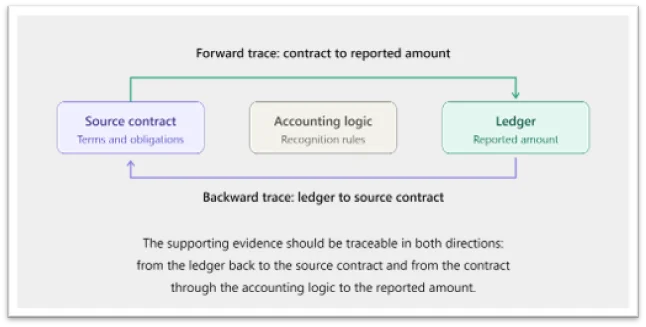
An audit-ready revenue recognition process should let an auditor move from a revenue journal entry through the revenue schedule and accounting logic to the underlying contract and data. Changes should be visible, manual adjustments controlled, and billing and accounting reconciled without rebuilding the bridge each month.
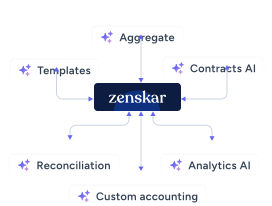
Zenskar, an AI-native revenue automation platform, generates revenue schedules from the same contract and usage data that drives billing, so no spreadsheet sits between invoice and journal entry. Standalone RevRec tools and ERP modules recognize revenue on a separate billing-data copy, leaving finance to reconcile two versions of every contract.
Indigov's CFO, John Zurbach, called revenue recognition the team's biggest problem. Schedules lived in Excel, contracts had signing-to-go-live gaps, and amendments required complex proration. On Zenskar's revenue recognition software, Indigov cut month-end close time by 80%. It now recognizes all active contracts in one batch run and reviews journal entries before posting to QuickBooks.
When does automation become the better RevRec investment?
The move makes sense when control burden and operating costs grow faster than the business can justify. Spreadsheets for revenue recognition remained the most-used tool in The SaaS CFO's 2025 tech stack survey, cited by 31% of 637 companies. Founder Ben Murray believes companies with $11M to $50M in ARR should be moving away from them. Look for these signals:
- Contract complexity is increasing. New pricing, amendments, usage, credits, or multiple performance obligations require spreadsheet workarounds.
- Close time is increasing. Controllers spend more time reconciling schedules than interpreting results.
- Audit preparation is repetitive. The same samples, reconciliations, explanations, and supporting files are rebuilt every year.
- Knowledge is concentrated. One or two people understand how the workbook works.
- Corrections have a measurable cost. Late adjustments, missed revenue, or revenue leakage spreadsheets surface only after close.
- Reporting needs are expanding. Finance needs contract-level visibility into revenue, RPO, waterfalls, or other metrics requiring repeated aggregation.
At Sardine, pricing complexity was the tipping point. The company prices customers in more than 200 different ways, and CFO Ben Cook says Zenskar automates every revenue recognition scenario out of the box. This shows the RevRec automation benefits when pricing permutations, rather than customer count, drive finance workload.
At Vertice, revenue and customer data were spread across CRM, Excel, and ERP, and finance manually updated billing and revenue recognition when contracts changed. After moving to Zenskar, Vertice reduced manual grunt work by 90% and closed books 70% faster.
How do you move revenue recognition off spreadsheets without opening an audit gap?
The best way to move revenue recognition out of spreadsheets is to treat the migration as a controls project, and keep the spreadsheet running until the new system has reproduced its historical results.
A clean move follows six steps:
- Inventory the workbook. List every contract type, judgment, override, and manual adjustment, including undocumented ones. Identify the source data, formulas, dependencies, and controls that support each calculation.
- Write the policy down. Document SSP, modification, and variable consideration treatment so the system follows policy, not workbook habits.
- Validate opening balances. Tie deferred revenue, contract assets, and unbilled receivables contract by contract.
- Run both in parallel. Close at least one period in both systems, ideally quarter-end, and resolve every variance.
- Agree on testing with your auditor. Walk them through the process before cutover and keep old workbooks as prior-period support.
- Measure against your baseline. Compare close days, reconciliation hours, and PBC turnaround with pre-migration figures.
Timing depends on contract complexity, data quality, and migration scope. Until automation is on the roadmap, Zenskar’s free deferred revenue spreadsheet template, together with the seven controls discussed above, can standardize your schedules. When comparing revenue recognition platforms, assess the controls, integrations, accounting logic, scalability, and finance automation ROI.
Spreadsheets can remain useful for analysis, but become expensive when they carry revenue recognition logic, evidence, and institutional memory. If your revenue recognition spreadsheet requires a specialist to maintain and a controller to reconcile, it is time to evaluate automation.
Book a demo to explore Zenskar's revenue recognition software and see how your team can move to a controlled, scalable RevRec process.

By automating recurring billing with Zenskar, our billing cycle – which previously took 7–9 days – now closes in 2 days, saving 16-20 hours/month.

Frequently asked questions
Revenue recognition in spreadsheets is risky because the workbook often becomes a manual copy of contract terms, accounting logic, and ledger data. Formula changes, overrides, amendments, and source-data updates may not leave a reliable audit trail, making errors harder to detect and the final revenue balance harder to substantiate.
The main limitations of spreadsheets for revenue recognition are weak change tracking, manual reconciliation, fragmented contract data, and difficulty scaling complex accounting rules. Each amendment, pricing change, or estimate reassessment can require manual updates across schedules, increasing the risk of inconsistent treatment and making audit evidence harder to assemble.
Revenue recognition can be managed in Excel only when contracts are relatively standardized, and the spreadsheet is supported by strong controls, including restricted access, documented changes, independent review, source-data validation, and regular reconciliation to the general ledger. As contract volume and complexity increase, maintaining those controls manually becomes more difficult and costly.
Spreadsheets cause revenue recognition errors through manual handoffs and changes, including re-keyed contract terms, incorrect service dates, broken formulas, hard-coded overrides, stale assumptions, and missed amendments. Because revenue schedules roll forward across periods, one incorrect input can affect multiple reporting periods before the issue is identified.
A company should consider moving from spreadsheets to revenue recognition software when contract complexity is increasing, close or audit preparation is taking longer, manual reconciliations consume significant finance capacity, or the process depends on one or two spreadsheet owners. Automation becomes especially valuable when new pricing models and amendments require recurring workarounds.

%20be%20truly%20invisible_.webp)

Stay Future-Ready with AI-Native Order-to-Cash
Zenskar scales with you - it's flexible, reliable, and enterprise-ready.
