
AI Prompts for Finance Teams: 5 Prompts Controllers Use Every Week (Copy-Paste Ready)

In a recent webinar where we hosted Nicolas Boucher, one of the most respected voices in AI for finance, he ran five live Claude for accounting workflows in real time. Not demos. Not slides. Live prompts, live outputs, live accounting work.
The results were striking. Tasks that typically take hours, such as invoice categorization, bank reconciliation, and ASC 606 analysis, were done in minutes, with output quality that was review-ready, not just directionally useful.
Finance teams using AI are no longer the early adopters. They're the ones setting the pace. The question isn't whether to use AI finance automation prompts for finance. It's whether your prompt library is ready.
In this blog, we'll share all five of Nicolas's prompts, adapted as copy-paste templates, along with guidance on how to use them safely and make them work harder for your specific data.
Before you prompt: what finance teams must never put in an AI prompt
Before we get to the prompts themselves, this section matters most. Finance data is sensitive. Public AI tools process data on shared infrastructure, and your inputs may be used for model training depending on your account type.
Here's what to never include in a prompt sent to a public AI tool:
- Real customer names, vendor names, or account numbers
- Actual invoice amounts tied to identifiable entities
- Proprietary contract terms or pricing structures
- Employee compensation data
Use anonymized or synthetic data for testing prompts. Replace real figures with placeholders ("Vendor A," "$X,000") until you're operating within a private or enterprise AI deployment where your data stays internal.
According to a LayerX Security Report from 2025, 77% of employees report pasting sensitive company data into public AI tools, including financial records. Building a prompt governance policy isn't optional anymore; it's risk management.
Two additional rules every controller should enforce on their team:
- Always review AI output before any financial action. AI is a first-draft tool, not an approval mechanism.
- Date-stamp AI outputs. Accounting standards and tax rules change. An ASC 606 analysis run in January may not reflect March guidance updates.
With that foundation set, here are the five prompts.
Your 5-prompt finance AI library
Prompt 1: Invoice organization and categorization
Use case: You've received a batch of invoices from AP and need to clean them up, flag anomalies, and prepare a structured summary for review.
You are a finance analyst. I will provide a list of invoices with vendor name,
amount, date, and category. Your task is to:
1. Identify any duplicates
2. Flag invoices above $[THRESHOLD]
3. Categorize by expense type using these categories: [LIST YOUR CATEGORIES]
4. Output a summary table sorted by category and amount descending
Here is the invoice data: [PASTE DATA]
What to customize: Your flagging threshold, your expense taxonomy (SaaS tools, travel, professional services, etc.), and your preferred output format (table, CSV-ready, narrative summary).
What the AI actually generates as output: A structured table grouped by category, a short list of flagged items with reasons, and a duplicate report. Most teams find the output is 90% ready for review, and the remaining 10% is judgment calls that the AI correctly flags as ambiguous.
If your invoices are flowing through Zenskar, this kind of categorization happens automatically as part of your revenue and billing data model, no copy-paste required.
Prompt 2: Bank reconciliation AI discrepancy analysis
Use case: Month-end close. You have a bank statement and a GL export that don't match, and you need to isolate exactly where the gaps are.
Here is my bank statement and GL export for [MONTH].
Identify:
1. All transactions in the bank statement not matched in the GL
2. All GL entries not in the bank statement
3. Any amount discrepancies for matched transactions
Format as a reconciliation report with three sections:
- Unmatched Bank Items
- Unmatched GL Entries
- Amount Discrepancies
Here is the data: [PASTE ANONYMIZED DATA]
What to customize: Column headers from your specific GL export (the AI needs to know how your data is structured to match correctly), and whether you want narrative explanations or pure data output.
What the AI actually generates as output: A three-section reconciliation report that mirrors what a senior accountant would produce manually, with unmatched items ranked by amount so the material ones surface first.
What typically takes 2 to 4 hours of manual matching can be reduced to 20 to 30 minutes of prompt setup and output review.
Prompt 3: Modeling from historical data: Revenue forecast AI template
Use case: You need a 12-month revenue projection for a board deck, and you want something more defensible than a straight-line extrapolation.
Using the monthly revenue data I provide, build a 12-month revenue forecast
using [linear regression / seasonal decomposition].
Show:
1. Month-by-month projection
2. Confidence range at 80%
3. Key assumptions underlying the model
Flag any months where the actual vs. projection variance exceeded 15% in the
historical data, and explain likely drivers.
Here is the historical revenue data: [PASTE DATA]
What to customize: Your preferred forecasting method (linear regression works for stable growth businesses; seasonal decomposition is better if your revenue has quarterly or annual patterns), your variance threshold, and the level of explanatory detail you need for stakeholders.
What the AI actually generates as output: A month-by-month table, a confidence band, and a plain-English explanation of assumptions, including flagged variance months with probable causes. This is genuinely presentation-ready with minor formatting adjustments.
The AI revenue forecast prompt approach works best when your input data is clean and complete. If you have gaps or anomalies in your historical data, prompt the AI to flag them before building the model.
Prompt 4: Full P&L model generation
Use case: You're preparing a period-over-period P&L comparison and need to move quickly from raw data to a structured model with variance commentary.
I will provide revenue and cost data by category for the last [X] quarters.
Build a full P&L model showing:
- Gross margin
- EBITDA
- Net income
Create a comparison against [prior period/budget].
Highlight variances above 10% with a brief explanation of likely drivers for each variance.
Here is the data: [PASTE DATA]
What to customize: Number of periods, your comparison baseline (prior period, prior year, budget), your variance threshold, and whether you want the output as a table, a narrative, or both.
What the AI actually generates as output: A complete P&L structure with variance columns and brief commentary on each flagged line item. The commentary is directional; it will correctly identify "cost of revenue increased relative to revenue growth," but won't know your specific vendor negotiations. That gap is your value-add as a controller.
Prompt 5: Revenue Recognition Analysis: ASC 606 prompt template
Use case: You have a new or complex SaaS contract and need to map it to the ASC 606 five-step model before revenue can be recognized.
This is the highest-value prompt in Nicolas Boucher's set, and the one most finance teams haven't tried yet.
Here is a SaaS contract [paste contract text or anonymized summary].
Identify:
1. All distinct performance obligations
2. Transaction price allocation using relative standalone selling price (SSP)
3. Recognition timing for each obligation point-in-time vs. over time
4. Any variable consideration elements (discounts, refunds, royalties)
Output as a structured revenue recognition schedule.
SSP assumptions: [STATE YOUR SSP ASSUMPTIONS]
What to customize: Your SSP assumptions are the most important input here. The AI will apply them consistently if you specify them clearly. If SSPs aren't established, prompt the AI to flag where SSP determination is required before recognition can proceed.
What the AI actually outputs: A structured RevRec schedule with each performance obligation mapped, allocated transaction price, and recognition timing formatted as a document you can attach to your workpaper.
For teams managing complex contract portfolios, manual ASC 606 analysis at scale becomes a bottleneck. This is precisely where revenue recognition automation built on deterministic logic rather than manual interpretation eliminates the risk of inconsistent application across contracts. Zenskar’s architecture separates AI extraction from financial computation. The recognition schedule itself runs on deterministic logic, and AI just surfaces what needs review.
How to make these prompts even better: 3 prompt engineering tips for finance
These templates are starting points. Here's how Nicolas structures prompts that consistently produce output worth using:
1. Specify the role before the task. "You are a finance analyst" or "You are an ASC 606 specialist" frames the output register. The AI calibrates vocabulary, depth, and format accordingly.
2. Define the output format explicitly. "Format as a three-section reconciliation report" is more effective than "organize the results." The more specific your format instruction, the less cleanup you do downstream.
3. Add a review instruction. End your prompt with: "Before providing the output, flag any assumptions you've made that I should verify." This surfaces ambiguity before it becomes an error in your workpapers.
As Nicolas put it: "The best AI prompt for finance is one that specifies the role, the task, the data format, and the output format. Vague prompts get vague results." If you'd rather not build each prompt from scratch, an AI prompt generator can scaffold the role, task, and format structure for you, then you fine-tune the specifics for your data.As organizations expand AI beyond individual productivity into company-wide workflows, many also work with experienced AI consultants to establish governance, integrate AI into existing business processes, and develop prompting frameworks that remain effective across different teams and use cases.
These three principles apply whether you're using Claude for B2B SaaS accounting or any other LLM.
When prompts aren't enough: connecting AI to live finance data
The five prompts above will meaningfully cut the time you spend on routine finance work. But after running them a few times, most controllers notice the same thing: the AI isn't the bottleneck. The data prep is.
The pipeline involves exporting from your ERP, cleaning the file, anonymizing vendor names, and formatting columns so the model understands them. This can easily take longer than the AI analysis itself. You've traded manual analysis for manual preparation, and the trade-off only goes so far.
The next evolution is AI that already has access to your live contract data, usage metrics, billing history, and revenue schedules, and can answer questions without manual data preparation.
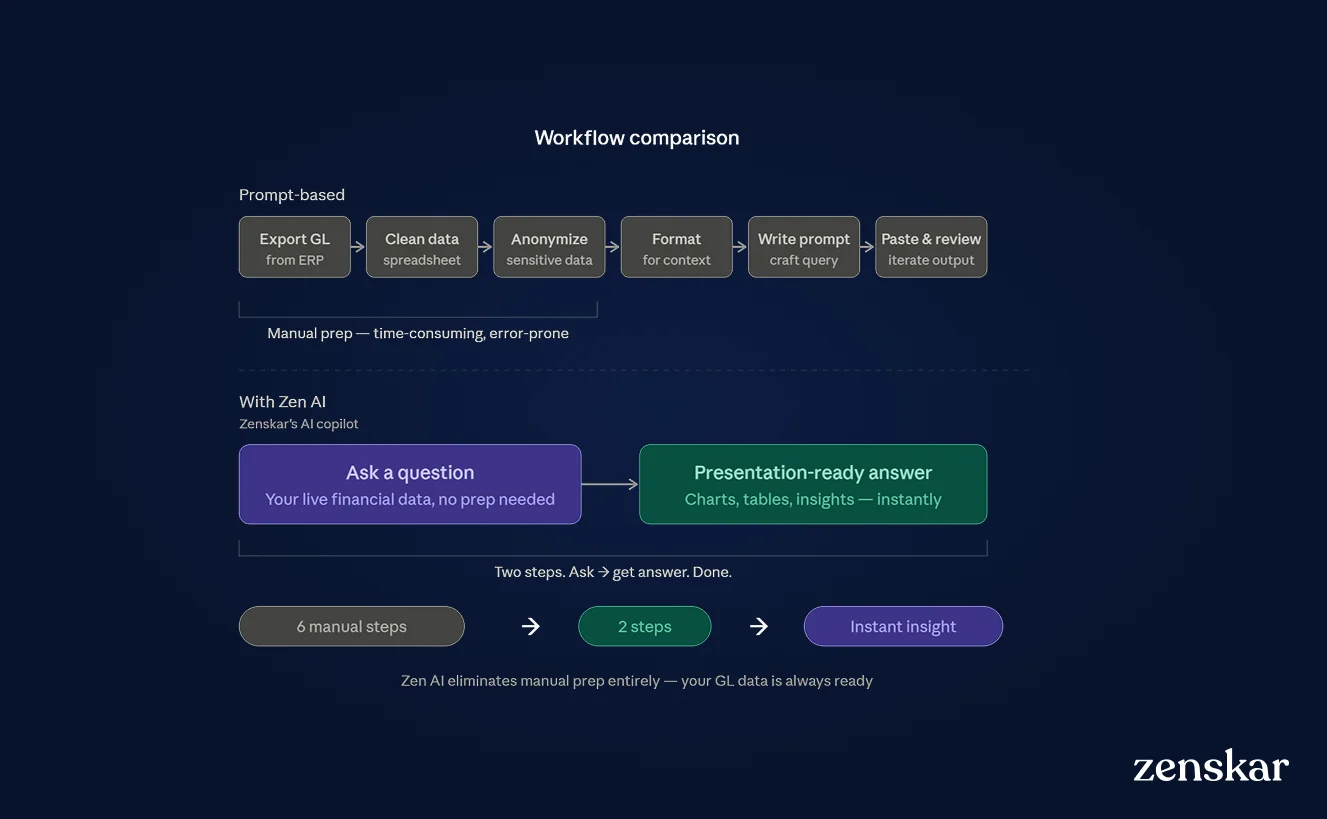
Zen AI, Zenskar's finance copilot, is connected directly to your live contract data, billing history, usage metrics, and revenue schedules. There's nothing to export, nothing to anonymize, nothing to paste. You ask a question in plain English, like "What's our MRR this month by product line?" or "Which contracts have unevaluated variable consideration under ASC 606?" and you get a chart, a list, or a schedule, ready to share.
The prompts in this post are the right place to start. They'll show you what AI-assisted finance work actually feels like, and they'll make your team faster today. But they're also a preview of a bigger shift: from AI that responds to your data to AI that already understands it.
That's the difference between a tool you feed and a copilot that's always up to speed.
Book a demo to see Zenskar’s analytics in action.
By automating recurring billing with Zenskar, our billing cycle – which previously took 7–9 days – now closes in 2 days, saving 16-20 hours/month.

Frequently asked questions
AI prompts for finance are structured instructions that direct an AI model to perform a specific financial task, such as bank reconciliation, revenue forecasting, or ASC 606 analysis, using data you provide. A well-crafted finance AI prompt specifies the role, task, data format, and desired output format.
Yes, with important caveats. Public AI tools like ChatGPT and Claude.ai can handle analytical accounting tasks effectively when given structured prompts. However, you should never include real customer names, actual account numbers, or identifiable financial data in prompts sent to public tools. Use anonymized or synthetic data, and always review AI output before any financial action.
Provide an anonymized contract summary and ask the AI to identify distinct performance obligations, allocate the transaction price using relative SSP, determine recognition timing (point-in-time vs. over-time), and flag any variable consideration. State your SSP assumptions explicitly in the prompt. The output should be reviewed by a qualified accountant before use in workpapers.
Use anonymized or synthetic data in public AI tools. Only use private or enterprise AI deployments for real financial data. Build a prompt governance policy that specifies which data types can and cannot be included in public AI prompts.
Zen AI is Zenskar's AI copilot built directly into the revenue automation platform. Unlike prompt-based AI tools, Zen AI already has access to your live contract data, usage metrics, billing history, and revenue schedules, so you can ask natural language questions and receive presentation-ready answers without data export or preparation.



Stay Future-Ready with AI-Native Order-to-Cash
Zenskar scales with you - it's flexible, reliable, and enterprise-ready.
