
Everyday, you shape strategy around your data: customers, contracts, invoices, payments, credit notes, usage events, revenue schedules. You collaborate with your team, send reports to the leadership, and take countless actions around it.
And of course, you use AI for this. But you have to download the underlying data, export reports, attach files as you go, spending more time on getting the right context, than you do on the actual task itself. It’s time to make this smoother.
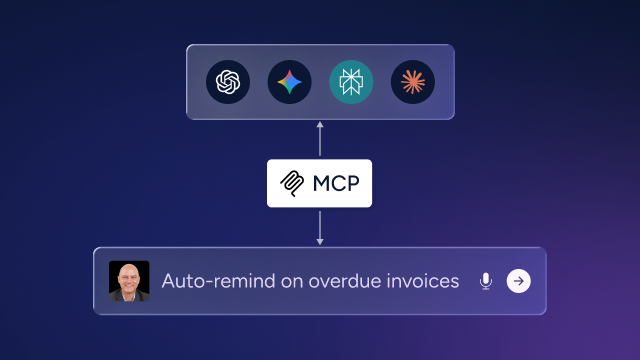
Zenskar's MCP changes how to operate with different tools, including your AI assistants. Ask a question, assign a task, collate a report – Get it all done without switching context within minutes, not hours.
MCP: A standard plug for for all your tools
MCP (Model Context Protocol) is an open standard introduced by Anthropic that allows AI to connect directly to the tools and data sources you already use. Instead of copying and pasting data, AI models can access and act on live systems. Think of it as a universal adapter that enables AI to work across MCP-compatible products. Businesses can leverage an AI workflow automation company to build connected workflows, automate tasks, and improve operational efficiency.The same pattern is spreading across categories - the best email MCP servers, for instance, let an assistant send and inspect mail the same way this one lets it work with your billing data.
MCP beyond finance, MCP is also expanding beyond finance into other business functions. In ecommerce, for example, platforms such as Koongo use MCP to let AI assistants work with product feeds, marketplace integrations, product data, and supported order workflows. This allows ecommerce teams to interact with operational tools through the same AI interfaces they already use.
For finance teams, this means your AI stops being a general-purpose writer and starts being an assistant with real-time access to your billing system, your contracts, your chart of accounts.
Think of it as a universal adapter: plug any MCP-compatible AI into any MCP-enabled product, and it can work there natively. For finance teams, this means your AI stops being a general-purpose writer and starts being an assistant with real-time access to your billing system, your contracts, your chart of accounts. As finance and ops teams adopt automation, platforms like Coworker AI let them hand multi-step work to AI agents connected directly to their own data, across 50+ tools like Slack, Salesforce, and bNetSuite.
Connect it in two minutes
Zenskar's MCP server is available now on GitHub. Install it, connect your credentials, and start with any of the prompts listed later in the article or just ask your AI to explore your workspace and go from there.
Your data is already there. The MCP just gives your AI a seat at the table.
Once installed, Claude, Cursor, ChatGPT, or any MCP-compatible client can access your Zenskar workspace directly. All you need is your Organization ID and an Auth Token from your Zenskar settings. No credentials are stored on the server — auth is passed through from your client on every request.
For Claude
Add to your Claude Desktop configuration (~/Library/Application Support/Claude/claude_desktop_config.json on macOS) :
Go to Settings → Connectors and add the Zenskar MCP server using your credentials.
Restart Claude Desktop, start a new conversation, and ask anything about your Zenskar data.
For others
Install globally:
Or run directly:
That’s it, your AI model now has the same visibility into your billing system as you do — across customers, contracts, invoices, payments, and accounting.
What can you actually do with Zenskar’s MCP
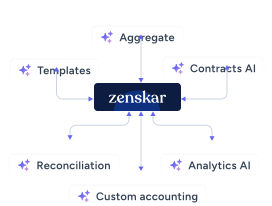
Zenskar's MCP works with 100+ tools spanning every revenue object or automation workflow.
💳 Billing: Contracts, Invoices & Payments
Your billing data is often the most time-consuming to access and the most critical to get right. With the MCP, your AI can query contracts, generate invoices, apply credit notes, and process payments — all from a single conversation, without anyone opening a dashboard.
What's possible:
- Contract management — Create, amend, pause, resume, or expire contracts. Add new phases and pricing tiers without touching the UI.
- Invoice generation & approval — Generate invoices for any customer across any date range. Approve, void, or download them instantly.
- Payment processing — Record manual payments, trigger auto-charges, issue refunds, and manage payment methods — all via natural language.
- Credit notes — Create credit notes against specific invoices, list all outstanding credits by customer, and apply them to open balances.
How it looks like in action:
"Generate an invoice for Acme Corp covering usage from April 1–30." → Calls generateInvoice with the customer ID and date range, returns invoice ID and line item breakdown.
"Pause the contract for TechStart Inc." → Locates the contract, calls pauseContract, logs the action.
"List all invoices currently in draft status." → Filters listInvoices by status, returns a structured summary with amounts and due dates.
📬 Collections: Customer Accounts & Receivables
Collections work is repetitive by design — the same checks, the same outreach, the same follow-ups, every cycle. The MCP lets your AI handle the operational layer: surfacing overdue balances, identifying customers with failed payment methods, and drafting the right message for the right account.
What's possible:
- Customer data — Search, create, update, or delete customer records. Manage addresses, contacts, and payment methods in bulk.
- Overdue invoice surfacing — Ask for all invoices past due by 30, 60, or 90+ days. Get a prioritized list with balances and last payment dates.
- Payment method management — Identify customers with no valid payment method on file. Attach new methods or flag accounts for follow-up.
- Customer portal config — Retrieve portal configuration for any customer, enabling self-service payment and invoice access.
How it looks like in action:
"Which customers have unpaid invoices older than 60 days? Rank them by outstanding balance." → Queries listInvoices filtered by status and due date, sorts by amount, returns a ranked list with customer names.
"Find all customers without a payment method attached." → Iterates listCustomers and listPaymentMethods, surfaces accounts with no valid method on file.
📒 Revenue & Accounting: GL, Journal Entries & Revenue Recognition
Revenue accounting at scale — especially with usage-based or subscription models — generates enormous complexity. The MCP gives your AI a direct line to Zenskar's accounting layer: journal entries, the chart of accounts, balance sheets, income statements, and the revenue engine underneath all of it.
What's possible:
- Chart of accounts — Retrieve the full GL account structure with category codes, account names, and currency metadata in seconds.
- Journal entries — Create manual journal entries with debit and credit lines. Query existing entries and list journal lines across any date range.
- Financial statements — Pull live balance sheet and income statement data. Ask for P&L by entity, period, or product line.
- Revenue recognition solution — Trigger recognition runs through to a specified end date and monitors job status as recognition completes.
How it looks like in action:
"Show me the income statement for Q1 2026." → Calls getIncomeStatement for the relevant period, returns a structured revenue and expense breakdown.
"Post a journal entry: debit Prepaid Insurance $12,000, credit Cash $12,000, memo 'Annual insurance policy renewal.'" → Formats and creates the journal entry with correct account codes, amounts, and memo.
"Run revenue recognition through April 30, 2026 and tell me when it's complete." → Calls recogniseRevenue, monitors the async job via getJobById, and returns confirmation with a summary.
📊 Analytics (Coming soon): Products, Plans & Business Intelligence
Finance teams spend a significant amount of time on ad hoc analysis and data science initiatives: which products are driving the most revenue, how a pricing change affects contract values, and what the pipeline of plan upgrades looks like. The MCP makes all of this queryable in plain English — no BI tool, no SQL, no data export required.
What's possible:
- Product & pricing catalog — List all products and their pricing configurations. Compare pricing tiers, identify unused products, or audit recent changes.
- Plan estimates & previews — Preview billing estimates for any plan configuration before going live — useful for pricing strategy and sales engineering.
- Usage event analysis — Query usage event schemas, retrieve event logs by customer or resource, and ingest new usage events programmatically.
- Multi-entity reporting — Pull data across business entities in one conversation. Compare revenue, payments, or contract values by entity side by side.
How it looks like in action:
"List all our active plans and their associated products." → Calls listPlans and getPlanById for each, returns a structured catalog with phase and pricing detail.
"Preview the estimated annual billing for a customer on our Growth plan." → Calls previewPlanEstimate, returns a projected charge schedule by phase.
"Show me the account balance for our deferred revenue GL account." → Retrieves the account from getChartOfAccounts, then calls getAccountBalance for the current period.
"Which customers had the highest total payments in the last 90 days?" → Queries listAllPayments filtered by date, groups by customer, and ranks by total.
Get closer to Zero-Touch finance
Access all the features of Zenskar without having to interact with the platform all the time. Assign tasks, review exceptions, and approve actions from major AI tools like Claude, ChatGPT, etc. or from Slack with our native agent.
The result: Humans supervise, agents execute. Let the agents take over.
If your current system has let you down or you’re ready for the future of finance, this is for you. Talk to us →

By automating recurring billing with Zenskar, our billing cycle – which previously took 7–9 days – now closes in 2 days, saving 16-20 hours/month.

Frequently asked questions
Stay Future-Ready with AI-Native Order-to-Cash
Zenskar scales with you - it's flexible, reliable, and enterprise-ready.
