
How to Use Claude for B2B Accounting: Live Workflows With Real Results

Most finance teams have experimented with Claude by now. They have asked a question, maybe pasted in a contract, and got something back that looked promising. Then moved on, because it wasn't clear how to make it repeatable.
The gap isn't capability. Claude can hold 200,000 tokens of context, read PDFs natively, and produce structured tables without heavy prompt engineering. The gap is in workflow design. Finance teams that are actually saving hours every close cycle aren't using Claude differently in terms of effort. They've just structured it properly once, and let it run.
In this blog, we've reconstructed five workflows from Nicolas Boucher's live Claude session for B2B SaaS teams, complete with the exact prompts, what Claude actually produces, and the time saved on each. If you're a controller or CFO evaluating whether Claude belongs in your accounting stack, this is where to start.
Why Claude (not just ChatGPT) for accounting workflows
Before we get into the workflows, a quick note on why Claude specifically matters for finance teams. The practical difference isn't about which AI is "smarter." It's about architecture fit for finance tasks.
Claude vs ChatGPT for accounting
For accounting work specifically, the 200K token context window means Claude can hold a full set of contracts, months of transaction history, and your accounting policies in a single session. That's not a marginal improvement; it fundamentally changes what's possible in a single workflow.
Related reads
Before you start: Setting up Claude for finance work
The single most important step is creating a Claude Project dedicated to finance before running any workflow, and a claude ai free course can help beginners understand how Claude Projects and prompts work before applying them to finance tasks. This approach can be particularly valuable for professionals delivering Accounting Services at Kanakkupillai, helping maintain consistency and efficiency across financial operations. Inside the project, add a system prompt that loads your company's accounting context once, so Claude carries it into every session automatically.
Inside the project, add a system prompt that includes:
- Your company's chart of accounts
- Your standard accounting policies (revenue recognition method, accrual basis, fiscal year)
- Your entity structure and currency setup
- Any recurring data formats you use (invoice templates, bank statement exports)
Here's a stripped-down example of what that system prompt looks like: "You are a senior accountant for [Company Name]. Our chart of accounts uses the following GL codes: [paste COA]. We recognize revenue on an accrual basis following ASC 606. Our fiscal year runs from January to December. We operate across three entities: [list entities] with reporting currency in USD. Invoice data is typically exported as CSV from our accounting tool."
To ensure data sanitization, replace customer names with IDs (Customer_001), mask account numbers, and remove SSNs or PII. Work only with anonymized datasets in Claude sessions.
That's it. Once this is in place, every workflow below runs with your company's context baked in. You're not re-explaining your setup every session, and your outputs are consistent across team members using the same project.
Workflow 1: Invoice organization and categorization
The problem
Unstructured invoice data from multiple vendors, in multiple formats, being manually sorted before entry.
The prompt
You are a B2B accounting assistant. I'm going to paste a batch of invoice data below.
Your tasks:
1. Extract: vendor name, invoice date, invoice number, amount, currency, and line-item description
2. Categorize each line item against the following GL codes: [paste your COA]
3. Flag any invoices with missing fields, duplicate invoice numbers, or amounts that deviate more than 20% from the prior period average for that vendor
4. Output as a structured table, with a separate "Exceptions" section at the bottom
Invoice data: [paste raw invoice text or PDF extract]
What Claude produces: A clean, GL-coded invoice table ready for ERP entry, plus a flagged exceptions list that would normally require a manual review pass.
Time saving: ~3 hours of manual categorization reduced to 20 minutes of review.
Workflow 2: Bank reconciliation analysis
The problem
Month-end bank reconciliation involves matching hundreds of transactions and chasing down discrepancies, a time-intensive, error-prone process.
The prompt
You are a senior accountant performing a bank reconciliation.
I'll provide two datasets:
- Bank statement transactions for [month]
- General ledger cash account entries for the same period
Your tasks:
1. Match transactions between the two datasets by amount and date (allow ±3 days tolerance)
2. List all unmatched items from each dataset separately
3. Calculate the reconciling difference
4. Flag any items over $[threshold] that appear in the bank statement but not the GL
5. Output: matched items table, unmatched items table, and a reconciliation summary
Bank statement: [paste data]
GL entries: [paste data]
What Claude produces: A three-part reconciliation report, matched, unmatched, and summary structured exactly as you'd present it for review.
Time saving: 4 to 5 hours of manual matching reduced to 45 minutes, including prompt setup.
Workflow 3: Revenue forecasting from historical data
The problem
Building a credible revenue forecast means layering cohort behavior, churn assumptions, and expansion logic and updating it every month.
The prompt
You are a SaaS financial analyst. I'm providing 12 months of revenue data by customer cohort.
Build a 6-month forward revenue forecast using the following assumptions:
- Monthly churn rate: [X%]
- Average expansion rate for customers >12 months: [X%]
- New business pipeline conversion: [X% of $Y per month]
- Billing model: [usage-based / subscription/hybrid]
Show your calculations. Output: monthly forecast table broken down by existing ARR, expansion, churn, and new business. Include a sensitivity table for ±2% churn scenarios.
Historical data: [paste]
What Claude produces: A monthly forecast table broken down by existing ARR, expansion, churn, and new business, with a side-by-side sensitivity table showing revenue outcomes at your base churn assumption versus plus and minus two percent. The output is structured to drop directly into a board or investor update with minimal reformatting.
Time saving: 4 hours reduced to 60 minutes, with built-in scenario modeling.
To tie your forecast to valuation or payback analysis, discount projected cash inflows at your WACC. For a quick check, try this online calculator for present value to calculate current value of future cash flows using Canva, then drop the PV outputs into your churn/expansion sensitivity table for a more grounded scenario comparison.
Related reads
- Deferred revenue calculator: free template for SaaS finance teams
- Ready-to-use templates for B2B finance teams
Workflow 4: Full P&L model generation
The problem
Building a P&L from scratch or rebuilding it after a reforecast requires pulling from multiple data sources and formatting for leadership presentation.
The prompt
You are a CFO-level financial analyst. I'm providing the following inputs:
- Revenue by product line (actuals + forecast): [paste]
- COGS breakdown: [paste]
- Operating expense data by department: [paste]
- Headcount and compensation data: [paste]
Build a full P&L model with:
1. Monthly columns for the current fiscal year (actuals vs. forecast)
2. Gross margin, EBITDA, and net income rows with % of revenue
3. Department-level opex breakdown
4. YoY comparison if prior year data is available
5. Executive summary: 3 bullet points on key drivers and risks
Format as tables. Flag any line item where actuals deviate >10% from forecast.
What Claude produces: A presentation-ready P&L model with variance flags structured to go directly into a board pack with minimal formatting work.
Time saving: Full-day model build → 2–3 hours of review and refinement.
Workflow 5: ASC 606 revenue recognition skill
This is the most differentiated workflow and the one Nicolas Boucher highlighted as the highest-value use of Claude for SaaS controllers.
Why it matters
ASC 606 compliance requires analyzing every contract for performance obligations, transaction price allocation, and recognition timing. For teams managing dozens or hundreds of contracts, this is where audit risk concentrates.
The prompt
You are a revenue recognition expert with deep knowledge of ASC 606.
I will provide you with a SaaS contract. Your tasks:
1. Identify all distinct performance obligations
2. Determine the transaction price, including variable consideration (usage overages, discounts, refund provisions)
3. Allocate the transaction price to each performance obligation using the relative standalone selling price (SSP)
4. Determine whether each obligation is recognized at a point in time or over time
5. Create a monthly revenue recognition schedule for the contract term
Output as structured tables. Flag any areas of judgment or where additional information is needed.
Contract: Here’s where you paste the contract text or upload a PDF.
What Claude produces: A structured ASC 606 AI analysis, performance obligations table, SSP allocation, and a month-by-month revenue recognition schedule, for each contract you run through it.
Time saving: 45 minutes per contract reduced to 10 minutes, with the judgment flags surfacing only the items that actually need human review.
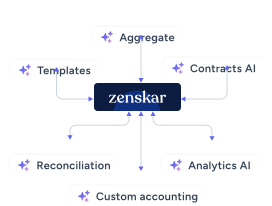
Zenskar's Contracts AI does what this prompt does automatically, for every contract, connected to your billing and revenue recognition AI engine. No prompt. No paste. No manual review gate for standard contracts. This works because Zenskar models every contract as a structured object (amendments, performance obligations, pricing dimensions), not as a PDF to be re-read. The contract data is always clean, always structured, always connected to the recognition engine. That's what makes automation possible at scale, not the AI itself. See Contracts AI in action.
Related reads:
- Finance terms glossary: AI Model-driven pricing, AI ARR, AI Attach Rate and more.
- Order-to-cash management: the end-to-end guide
Building your Claude accounting workflow system
Running these five workflows ad hoc with Claude accounting prompts is useful. Running them as an automated system is transformative.
Here's how to build it:
- Create one Finance Project in Claude. Add your COA, accounting policies, entity structure, and any recurring data formats to the Claude Project’s finance context. This is your firm's accounting context; it never has to be re-entered.
- Build a prompt library. Save each of the five prompts above as named templates inside Claude Projects. As you refine them for your company's specifics, the library becomes proprietary to your team.
- Add a validation prompt layer. A risk bigger than missing data is Claude confidently being wrong. Append this line to any workflow prompt: "After completing your analysis, list any assumptions you made and flag any calculations you are less than fully confident in." This surfaces most hallucination risk before it reaches review. As David of SIXGUN notes, AI hallucinations are not limited to finance workflows; similar challenges exist in marketing, making validation and review essential regardless of the use case.
- Establish a review gate. Claude is a first-pass analyst, not a replacement for judgment. Define which outputs go straight to ERP entry (e.g., clean invoice batches) and which require a senior review (e.g., ASC 606 judgment calls, forecast assumptions).
- Version-control your prompts. As team members refine prompts over time, track changes in a shared doc. A prompt that's been iterated across three close cycles is significantly more reliable than one that hasn't. Treat your prompt library the way you'd treat any other internal accounting policy document.
The teams winning with AI prompts for finance teams aren't using more tools; they're using fewer tools, better configured.
The next step: Claude with live financial data
The gap Claude can't close on its own is data connectivity. Legacy tools bolted usage onto subscription software. Today, AI is being bolted onto those same broken systems. Every workflow above requires you to paste or upload data manually. For one-off analysis, that's fine. For recurring close workflows, invoice processing, bank recon, and RevRec schedules, the paste step is the bottleneck.
That's where Zenskar's revenue recognition automation comes in. Zenskar is built differently: AI-native from the foundation, deterministic logic for all financial computations, agents for the rest. Zenskar sits between your CRM and ERP, handling billing and RevRec for the real-world complexity that breaks spreadsheets and legacy tools, usage-based pricing, mid-cycle amendments, prepaid credits, multi-entity, and multi-currency.
Zen AI brings AI-native reasoning into that layer, not bolted on, but built into the same foundation as the billing engine and RevRec engine. The result: the analysis Claude does manually in the workflows above happens automatically through AI agents for banking operations, every billing cycle, with no prompt required. Think of it as Claude's reasoning capability, running on live financial data, connected to your revenue engine.
Book a demo to see Zenskar’s analytics in action.
By automating recurring billing with Zenskar, our billing cycle – which previously took 7–9 days – now closes in 2 days, saving 16-20 hours/month.

Frequently asked questions
Use the Workflow 5 prompt above: provide Claude with your contract text or PDF, and ask it to identify performance obligations, allocate transaction price using SSP, and generate a monthly recognition schedule. For teams processing large contract volumes, Zenskar's Contracts AI automates this at scale.
For finance-specific tasks, Claude's advantages are: a larger context window (200K vs 128K tokens), native document reading (PDFs without extraction), and more reliable structured output. Claude Projects also allow you to persist the company context, COA, policies, and entity structure across sessions.
No, and it shouldn't. Claude acts as a structured first-pass analyst: it handles volume, formatting, and initial analysis faster and more consistently than manual work. The judgment calls ASC 606 edge cases, forecast assumptions, and material variance explanations still require an experienced accountant. The value is in reclaiming the hours spent on mechanical tasks, so finance teams can focus on the work that actually requires expertise.
Anthropic offers enterprise-grade data handling through Claude.ai Teams and Enterprise plans, including no training on submitted data by default. For most finance teams, best practice is to use anonymized data, avoid sharing sensitive information, and follow internal data policies.
Claude is not a replacement for ERP systems or audit trails. It cannot connect to live data, post journal entries, or serve as a system of record. All outputs require human review before use.



Stay Future-Ready with AI-Native Order-to-Cash
Zenskar scales with you - it's flexible, reliable, and enterprise-ready.
