
How to Use Claude Desktop for Business Billing: What It Can Do, What It Can't, and What Comes Next

Finance leaders are moving fast with AI. Claude Desktop is one of the first tools they reach for because it's smart, it's free to start, and it can hold a surprisingly sophisticated conversation about invoice terms, contract clauses, and revenue recognition.
What makes this moment different is not just AI capability, but where teams are trying to apply it. Billing is no longer a back-office function. It sits at the center of pricing, revenue predictability, and customer experience. So when finance teams experiment with tools like Claude Desktop, they’re not just looking for productivity gains; they’re testing whether AI can actually support core revenue operations.
But there's a gap between what Claude Desktop does well and what your billing workflow actually needs. This guide is honest about both sides.
In this guide, you'll get a clear breakdown of the 5 billing tasks Claude Desktop genuinely handles well, the 4 tasks it simply cannot do, a step-by-step setup for finance workflows, and what it looks like when AI reasoning connects to real billing infrastructure, not just a chat window.
What is Claude Desktop? (And why finance teams are interested)
Claude Desktop is Anthropic's local AI assistant app, released in November 2024, that runs on your Mac or Windows machine. Unlike the browser-based version, it supports Projects: persistent context sessions where you can upload documents, set system-level instructions, and maintain a working memory across conversations.
For finance teams, that's the key unlock. You can load your billing policy, payment terms library, and contract clause templates into a project once, and Claude draws on them every time you ask a question. No re-pasting. No re-explaining. That's genuinely useful. But when Claude Desktop is accessed from Windows devices handling sensitive financial data, controls such as Windows MFA can add an extra layer of protection for user access. Claude and similar AI tools are useful for thinking, not useful for doing. That distinction matters more than most guides acknowledge.
This is precisely why Claude Desktop feels immediately valuable to finance teams. It reduces the friction of working with complex documents and policies. But that value is concentrated at the interpretation layer. As workflows extend into billing operations, the requirements shift from understanding information to acting on it within controlled systems.
5 billing tasks Claude Desktop handles well
Let's be specific. These are tasks where Claude AI for finance delivers real controller-grade quality, not vague 'AI assistance'.
1. Drafting invoice language and payment terms
Feed Claude a contract summary with details like customer name, contract value, milestone triggers, payment terms, and it will draft invoice-ready language that matches your company's tone and legal requirements. Ask it to reference your uploaded payment terms policy, and it will.
This replaces 30-45 minutes of copy-editing per non-standard invoice.
2. Analyzing and summarizing contract terms for billing triggers
Paste a contract or an excerpt of a contract, and ask Claude to extract every billing trigger: start dates, milestone deliverables, usage thresholds, renewal clauses, and variable consideration terms. It outputs a structured summary you can hand directly to your billing team.
For SaaS companies with complex multi-year enterprise agreements, this alone saves hours per deal.
3. Generating revenue recognition schedules
Under ASC 606, every contract needs a performance obligation analysis and a recognition schedule. Claude can generate a draft RevRec schedule from pasted contract data, identifying distinct obligations, allocating transaction price by relative standalone selling price, and flagging variable consideration.
It's a first draft, not a signed journal entry. But it's a very good first draft.
4. Writing dunning email sequences
Give Claude your overdue invoice data (anonymized), your company's escalation policy, and your tone guidelines. It will produce a multi-stage dunning sequence with appropriate urgency calibration at each level: Day 3 friendly reminder through Day 45 collections escalation.
Finance teams report that this alone saves 2-3 hours per week for teams managing 50+ open invoices.
5. Answering billing policy questions
Load your billing policy, revenue recognition policy, and AR procedures into a Claude Project. Then use Claude as a real-time policy reference. New hire asks about credit memo procedures? Unusual contract structure from a sales rep? Claude answers from your actual documentation, not hallucinated defaults.
The common thread: Claude Desktop is extraordinary at reasoning over the documents you provide. Every strong use case above involves giving Claude structured inputs and asking for structured outputs. It's a thinking partner, not an operator.
Across these use cases, the pattern is consistent. Claude Desktop performs best when the task is bounded, the inputs are structured, and the output is meant to guide a human decision. In those scenarios, it acts like a strong extension of the finance team.
The challenge begins when those outputs need to move beyond guidance and into execution. That’s where workflows stop being about answers and start being about systems, dependencies, and control.
3 billing tasks Claude Desktop cannot do (yet)
This is the section most guides skip. Knowing the shortcomings of any platform will help you be prepared for what to expect and how to circumvent them.
1. Push invoices to billing platforms without MCP setup
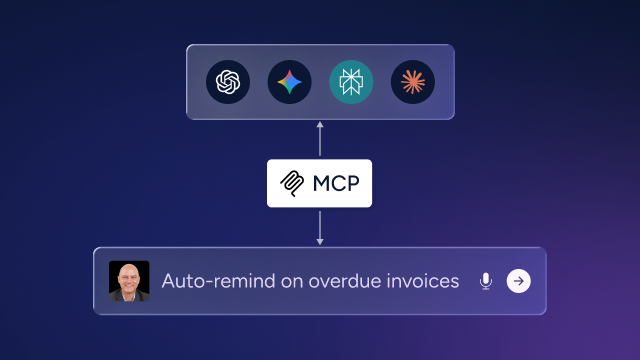
Anthropic launched MCP (Model Context Protocol) in November 2024, and remote MCP connectors became available in January 2026. Through MCP, Claude can now push data into billing and CRM platforms — but only when those integrations are deliberately configured. Developers creating similar AI integrations can benefit from an AI gateway for Mac developers that streamlines communication between AI models and local desktop tools. For example, via Zoho MCP, Claude can find an invoice and mark it as paid, then For developers building AI-powered desktop apps on macOS, an AI gateway for Mac developers can provide a dedicated environment for working with AI models during development and send a payment confirmation email to the customer — all from a single prompt.
When connecting Claude to billing and accounting platforms — QuickBooks, Zoho Books, Sage Intacct, and NetSuite — via the Model Context Protocol (MCP), three important caveats apply: these connections require deliberate setup beyond simply installing Claude Desktop, some platforms (such as Sage Intacct) default to read-only access meaning Claude can query data but not create or update records without additional configuration, and at least one platform (NetSuite) requires a paid Claude Pro subscription or higher before the AI Connector can be enabled at all.
2. Pull live usage data for consumption billing
Usage-based billing with metered API calls, seat expansions, and consumption tiers requires real-time data from your data warehouse or usage metering layer. Claude Desktop has no connection to that data. You can paste historical usage exports and get analysis, but you cannot ask 'what does this customer owe this month?' and get a live answer.
3. Maintain audit trails
Claude's conversations are not financial records. There's no version history, no approval workflow, and no traceability to a specific user action. For revenue recognition and billing, audit trails aren't optional; they're required. Claude Desktop, on its own, cannot provide that layer.
The architectural reason why Zenskar can maintain audit trails is that all financial computations run on deterministic, rule-based logic with complete transparency and traceability. AI assists, it doesn’t execute. That’s what makes the audit trail defensible.
Here’s where Zenskar can join forces with Claude Desktop to give you a comprehensive solution. Let’s see how Zenskar complements Claude Desktop for billing cycle automation.
Step-by-step: Setting up Claude Desktop for finance workflows
If you're going to use Claude Desktop for finance setup, like billing tasks, here's how to organize it properly instead of just opening the app and starting to chat.
- Step 1: Download Claude Desktop from claude.ai/download — available for Mac and Windows.
- Step 2: Create a Project in Claude Desktop. Projects maintain context across sessions, so your finance documentation persists.
- Step 3: Upload your reference documents: billing policy, payment terms templates, contract clause library, and dunning escalation framework.
- Step 4: Set a Project Instruction — a system-level prompt telling Claude it's operating as a finance assistant for your company. Example: 'You are a finance assistant for [Company]. You follow GAAP, our billing policy (attached), and ASC 606 for revenue recognition. Always flag assumptions.'
- Step 5: Test with a real billing task using anonymized or synthetic data before connecting to live workflows.
The prompt structure that gets controller-grade outputs
Most finance teams underperform with Claude because their prompts are vague. Here's a structure that works:
This is the core limitation of AI tools designed as reasoning assistants: they sit outside the system, not inside it. Bolting a reasoning layer onto a legacy billing stack is the same pattern as bolting AI onto any broken foundation. The analysis improves. The underlying problems don’t.
The ceiling: why Claude Desktop alone isn't a billing system
Claude Desktop is the reasoning layer without the execution layer. That's a meaningful capability gap for finance operations.
Think about what a billing workflow actually requires end-to-end. A contract is signed. Terms need to be read and billing triggers extracted. An invoice needs to be created, matched to customer records, and sent at the right milestone. Usage data needs to be pulled, rated, and appended. The invoice needs to be tracked, matched to payment, reconciled, and journaled. Revenue needs to be recognized on schedule and documented for audit.
Claude Desktop can assist with the analysis at several steps in that chain. But every handoff between Claude and your billing system is a manual step, and manual steps are where errors, delays, and compliance gaps accumulate.
The finance teams winning in 2026 aren't using AI as a chat tool sitting next to their billing system. They're connecting AI reasoning directly to billing execution so the analysis triggers action, not another to-do item.
In a recent webinar where Zenskar hosted finance AI expert Nicolas Boucher, he put it clearly: 'Claude isn't a billing system, it's a thinking partner. You still need the infrastructure behind it.' That gap is exactly what the next generation of AI-native billing infrastructure is built to close.
Claude + Zenskar: what happens when AI meets real billing infrastructure
Claude Desktop makes finance teams faster at thinking. It improves how contracts are interpreted, how invoices are drafted, and how revenue is analyzed. But billing workflows don’t break at the thinking stage. They break at execution, where every insight needs to translate into system actions that are consistent, traceable, and audit-ready. That’s where most teams start to feel the strain.
When analysis sits outside your billing system, every output becomes a handoff. And at scale, handoffs are not just inefficient, they’re where delays creep in, revenue slips through the cracks, and reconciliation becomes reactive instead of controlled. The shift underway isn’t about generating better answers. It’s about removing that dependency on manual follow-through altogether.
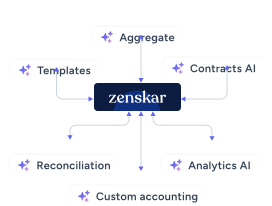
Instead of assisting workflows, the system needs to carry them through, connecting contract logic, usage data, invoicing, and revenue recognition so that actions are triggered as part of the workflow itself, not layered on after. This is the direction modern finance teams are moving toward, and it’s what platforms like Zenskar are built to enable, bringing AI directly into the operational layer of billing rather than keeping it separate.
Zenskar eliminates handoffs architecturally with contracts modeled as objects on a graph. Billing triggers, recognition events, and modification logic are already part of the data model, not translated from a document into a separate system.
If you’re evaluating how to move beyond standalone AI billing software, it’s worth seeing how this looks in practice, where reasoning doesn’t just inform decisions, it drives execution across your billing workflows.
Book a demo to see Zenskar’s analytics in action.
By automating recurring billing with Zenskar, our billing cycle – which previously took 7–9 days – now closes in 2 days, saving 16-20 hours/month.

Frequently asked questions
No. It can assist with drafting and analysis, but it cannot execute workflows like invoice creation, billing runs, or reconciliation inside your systems.
Claude Desktop is best for pre-execution tasks like contract analysis, revenue recognition planning, invoice drafting, and answering billing policy questions.
Finance teams still need a billing system with Claude Desktop because Claude Desktop does not connect to live data or systems. All outputs must be manually transferred and executed in a billing platform.
Errors using AI in billing workflows usually happen during handoffs, when AI-generated insights are manually interpreted, entered into systems, or executed without automation.
Finance teams are scaling AI beyond standalone tools by embedding AI directly into their billing infrastructure, so insights trigger real actions like invoice creation, usage billing, and revenue recognition automatically.



Stay Future-Ready with AI-Native Order-to-Cash
Zenskar scales with you - it's flexible, reliable, and enterprise-ready.
