

Zenskar vs Zone Billing: Platform Comparison
Discover the top Zone Billing alternatives for businesses that have outgrown NetSuite's native billing capabilities. Compare features, pricing, and capabilities to eliminate engineering dependencies and automate complex billing scenarios.
Introduction
Zone Billing has established itself as a powerful NetSuite-native solution for businesses that have already committed to Oracle's ERP ecosystem. It offers finance teams deep integration and eliminates middleware complexity.
However, as your business evolves and adopts more complex pricing models or nuanced revenue recognition requirements, Zone Billing's limitations begin to surface.
The platform locks you into NetSuite's infrastructure, requires engineering bandwidth for non-standard pricing scenarios, and lacks features like entitlement management. Finance teams often find themselves relying on spreadsheet workarounds for complex revenue recognition and Power BI for reporting.
This guide breaks down these constraints and compares seven modern alternatives: Zenskar, Chargebee, Maxio, Recurly, Stripe Billing, Zuora, and Sage Intacct, that offer greater flexibility, stronger automation, and ERP independence, while preserving the financial controls growing companies rely on.
Switch to zero-touch FinOps with Zenskar
Zone Billing alternatives: Comparison at a glance

7 Zone Billing Alternatives in 2026
1. Zenskar vs Zone Billing
Zenskar is an AI-native order-to-cash platform built for modern finance teams who are tired of being stuck between spreadsheets, engineering tickets, and month-end chaos.
Unlike Zone Billing's NetSuite-exclusive, rigid architecture, which requires heavy engineering involvement for edge cases, Zenskar empowers finance teams with operations that run themselves; no developers or manual workarounds are needed for any complex pricing, PLG, or SLG motions.
How Zenskar beats Zone Billing
1. No more manual spreadsheet workarounds
With Zone Billing, every non-standard pricing scenario means manual workarounds. You're building spreadsheets to track prepaid credits, manually calculating prorations, and hoping nothing breaks during the month-end close.
Zenskar's AI agent does this work for you. Upload your contract PDFs, and Contracts AI extracts the terms, sets up billing schedules, and automatically generates performance obligations. Your month-end close happens in hours, not days.
2. Stop waiting on engineers for pricing changes or metering
Zone Billing requires your engineering team to embed contract IDs and pricing identifiers into your product database, data that doesn't naturally belong there. Every time you change a pricing structure, engineers have to update the codebase.
Want to add a new usage metric or modify how you aggregate data? That's another engineering ticket.
Even simple changes, like updating a discount structure or adjusting how you bill for usage, require code changes and deployments.
Zenskar eliminates this dependency. Send raw usage data from anywhere, your database, data warehouse, or even a CSV, and Zenskar automatically determines which customer, contract, and pricing model apply. No product database changes needed.
You can also configure any pricing model, including usage-based, hybrid, tiered, or matrix, through a simple visual interface.
Sales negotiated a custom discount? Update it yourself in minutes. Want to bill for different usage metrics? Change aggregation rules without involving engineering.
3. Finally, true entitlement management
Your product team needs to build and maintain its own entitlement system because Zone Billing can't handle prepaid credits, usage limits, or feature access. They need to track balances, send alerts, and manage overages via custom code that breaks every time something changes.
Zenskar's entitlement engine does this natively. Grant credits, track depletion, enforce limits, charge for overages, manage rollovers, etc. Your product team can focus on building features, not billing infrastructure.

Features
- Configure subscriptions, usage-based (prepaid/postpaid), hybrid pricing, 2D/matrix pricing, tiered, volume, step models, and conditional discounts, all without code
- Ingest usage via 200+ native connectors (databases, warehouses, Google Sheets), optional APIs, and CSV uploads, and aggregate it via dashboard or SQL aggregator.
- Create journal entries automatically & sync for all accounts (AR, revenue, unbilled, deferred, gateway expenses, tax payables) with complete ASC 606/IFRS 15 compliance.
- Connect with multiple instances of ERP (NetSuite, QuickBooks, Xero, Rillet, etc) with bi-directional sync for multi-entity accounting.
- Access real-time, customizable dashboards for MRR, ARR, churn, LTV, revenue waterfall, and more, with Analytics AI that answers questions in plain English and generates reports in seconds.
- Get feature-level access control, prepaid balance tracking, usage limits, automated overage management, and rollover logic
- Enable customer self-service with a fully customizable portal for viewing contracts, invoices, balances, making payments, updating plans, and purchasing credits
Pros
- AI automates the entire order-to-cash process with zero manual busywork
- No ERP lock-in—works with NetSuite, QuickBooks, Xero, and others
- Multi-entity accounting under one login across different ERPs or regions
- Configure any pricing model without code or engineering involvement
- 24/7 support via Slack, Zoom, and email at no extra cost
- Go live in 6-12 weeks with hands-on implementation support
- Finance teams make changes independently without waiting for engineering tickets
Cons
- Zenskar does not currently offer quoting capabilities (integrates with third-party CPQ tools)
- No support for non-revenue features like expense management and accounts payable
Why is Zenskar the best Zone Billing alternative?
Cannot enforce feature access or usage limits
decoupled architecture,
No product database changes needed from your side
injects objects into your instance
adapts to your existing setup without forcing changes
Vertice closed books 70% faster with Zenskar
2. Chargebee vs Zone Billing
Chargebee is a subscription billing and recurring revenue management platform designed to address the operational complexities faced by subscription-based businesses.
The platform offers an intuitive interface that makes it accessible to non-technical teams, while providing flexible billing models that can adapt to diverse pricing strategies. With native integrations across major payment gateways and support for multiple currencies, Chargebee streamlines the entire billing workflow from invoice generation to payment collection. These capabilities have made it particularly popular among SMB businesses in industries like SaaS, eCommerce, education, and digital media.
While Chargebee handles recurring billing well, it struggles with complex usage-based pricing, requires workarounds for non-standard scenarios, and lacks comprehensive revenue recognition compared to more robust platforms. If you’re evaluating options that offer greater flexibility beyond Chargebee, this guide on Chargebee alternatives is worth reading.

Source: Chargebee
Common challenges with Chargebee
1. Your engineering team becomes the billing team
Chargebee requires your engineers to embed contract IDs, pricing identifiers, and customer mappings directly into your product database, data that doesn't naturally belong there. You need to build new tables for subscriptions, prices, and usage mappings, then maintain them in sync with Chargebee via webhooks and custom code.
Every time sales negotiates a new pricing structure, engineering needs to update the codebase. Want to change how you aggregate usage? That requires backend changes. Your product team ends up maintaining billing logic instead of building features.
2. Manual workarounds for standard SaaS scenarios
Need to implement minimum commitments? There's no native support. You'll need to build custom logic or use coupon workarounds. Want to charge platform fees as a percentage of usage? More custom code. Trying to mix prepaid and arrears billing in the same contract? Get ready for manual adjustments and reconciliation headaches.
These aren't edge cases; they're common SaaS billing scenarios that Chargebee can't automate, forcing your finance team to rely on spreadsheets and manual processes.
3. Entitlements require building your own system
Chargebee offers basic quantity-based entitlements, but that's where it stops. You can't track usage against entitlements in real-time. You can't set up dynamic rules for tier resets or rollovers. You can't manage multiple entitlements for the same product.
Your engineering team ends up building an entire entitlement deduction layer, tracking balances, sending alerts when limits are reached, managing overages, all custom code that needs maintenance and creates technical debt.
4. Revenue recognition falls short
Chargebee's accounting capabilities stop at AR, revenue, unbilled revenue, and deferred revenue, and even these are tightly coupled with invoices. If you have prepaid entitlements, complex usage-based revenue allocation, or need to handle payment gateway expenses and tax payables, you're on your own.
Finance teams end up maintaining separate spreadsheets for revenue recognition or paying for additional tools like Maxio or RevPro just to stay compliant.
Features
- Track basic metrics: Reports for MRR, ARR, and subscription performance
- Manage subscription lifecycles: Automate trials, upgrades, downgrades, renewals, and cancellations
- Connect with payment gateways: Integrates with Stripe, PayPal, Braintree, and other processors
- Handle international billing: Multi-currency support and localized payment methods
- Reduce payment failures: Automated dunning management with retry workflows
- Stay tax compliant: Avalara integration for automated VAT and sales tax calculations
- Enable customer self-service: A portal for subscription management and payment updates
Pros
- Simple, intuitive interface for non-technical teams
- Quick implementation—typically live within weeks
- Strong automation for standard subscription workflows
- 60+ integrations with CRMs, ERPs, and accounting tools
- Transparent pricing with no surprise fees
- Good documentation and onboarding resources
Cons
- Engineering dependency for usage-based pricing and custom scenarios
- No native support for minimum commitments or platform fees
- Entitlements require custom product-level development
- Revenue recognition limited to basic accounts only
- Inflexible proration; can't control what gets prorated
- Customer support is slower for non-enterprise tiers
Quick Comparison: Zone Billing vs Chargebee
3. Maxio vs Zone Billing
Maxio (formerly SaaSOptics and Chargify) is a subscription billing and financial reporting platform built specifically for B2B SaaS companies. It combines billing automation with revrec and reporting capabilities, offering finance teams a unified system for managing the subscription lifecycle.
It provides seamless integrations with CRMs like Salesforce and ERPs like QuickBooks and NetSuite, ensuring smooth financial operations across all departments.
Maxio can easily handle multiple billing scenarios, multi-entity, multi-currency billing, and revenue recognition (revrec) for SaaS companies.
However, businesses with non-standard pricing, high-volume usage metering, or the need for rapid pricing iterations may find the platform's architecture limiting, forcing them to seek Maxio alternatives.
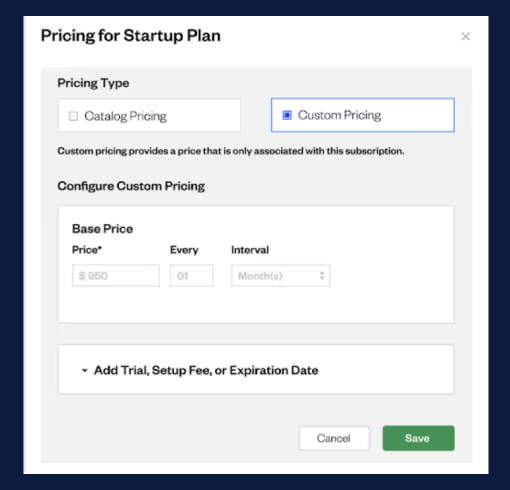
Source: Maxio
Features
- Subscription billing management: Supports fixed, recurring, and simple usage-based pricing models
- Automated revenue recognition: Ensures compliance with ASC 606 and IFRS 15 standards
- Advanced SaaS analytics: Provides cohort analysis, cash flow projections, and churn metrics
- Financial reporting: Generates detailed reports for MRR, ARR, and revenue attribution
- Expense tracking and allocation: Automates expense recognition across departments
- Multi-gateway payment support: Integrates with multiple payment processors
- Two-way CRM/ERP sync: Connects with Salesforce, HubSpot, QuickBooks, NetSuite, and more
Pros
- Purpose-built for B2B SaaS with subscription-focused features
- Deep integrations with Salesforce, HubSpot, and major ERPs
- Advanced analytics, including cohort analysis and forecasting
- Automates ASC 606/IFRS 15 compliance for standard models
- Strong financial reporting capabilities
Cons
- Two-system architecture (Chargify + SaaSOptics) creates sync challenges
- Pricing tied to product logic; requires dev work for changes
- No native database or warehouse connectors for usage data
- No entitlement management capabilities
- Limited real-time usage metering support
- Implementation typically takes 6-9 months with consultant help
- Invoice and email language support is restricted to English
Quick Comparison: Zone Billing vs Maxio
4. Recurly vs Zone Billing
Recurly is a recurring billing platform designed to simplify subscription management with a focus on customer retention and churn reduction. Built for businesses with high-volume recurring billing, Recurly offers an intuitive interface and strong subscription automation features that appeal to both B2C and B2B companies.
Recurly's strength lies in its user-friendly setup, automated dunning workflows, and built-in retention tools. The platform handles subscription trials, supports multiple subscription types within a single account, and integrates with popular payment gateways, including PayPal and Stripe. For businesses with straightforward subscription models, Recurly alternatives provide a cost-effective solution that can be deployed quickly.
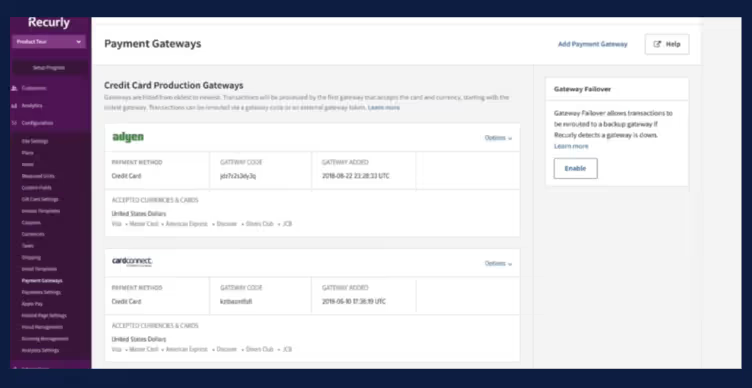
Source: Recurly
Features
- Recurring billing automation: Manages subscription lifecycles, including trials, renewals, and cancellations
- Automated dunning management: Customizable workflows to recover failed payments and reduce involuntary churn
- Multi-subscription support: Handle multiple subscriptions per customer account
- Payment method flexibility: Supports credit cards, ACH, PayPal, and other payment options
- Churn analytics: Track retention metrics and identify cancellation patterns
- Fraud protection tools: Built-in security features to prevent payment fraud
- Tax compliance support: Basic tax handling with integration options
- Subscription insights: Analyze subscriber data and cancellation reasons
Pros
- Simple, intuitive interface for quick deployment
- Strong subscription automation for standard recurring models
- Automated dunning reduces involuntary churn effectively
- Supports multiple currencies for international billing (140+ currencies)
- Competitive pricing suitable for small to mid-market businesses
- Faster implementation compared to enterprise platforms
Cons
- Limited flexibility for custom contracts and complex pricing
- Rigid invoicing templates with minimal customization options
- Transaction fees on every payment attempt, including fraudulent ones
- Reporting lacks depth for advanced financial analysis
- No real-time revenue recognition automation
- Integration issues with QuickBooks and Salesforce require manual fixes
- Customer support response times can be inconsistent
- Trials tracked as coupons make conversion tracking difficult
Quick Comparison: Zone Billing vs Recurly
5. Stripe Billing vs Zone Billing
Stripe Billing is a subscription and invoicing platform that extends Stripe's payment processing infrastructure. Known for its developer-friendly APIs and excellent documentation, Stripe Billing appeals to tech-forward companies that want to build custom billing workflows with code.
Stripe Billing works well for businesses with straightforward subscription models and in-house development resources. The platform offers flexible APIs, supports multiple pricing models, and seamlessly integrates with Stripe's global payment infrastructure. For companies already using Stripe Payments, adding Stripe Billing can seem like a natural extension.
However, Stripe Billing's linear data model and tight coupling with Stripe Payments create constraints for businesses with complex pricing needs. Finance teams often find themselves dependent on engineering for simple changes, and the platform lacks native revenue recognition and advanced financial automation, forcing users to seek Stripe Billing alternatives.
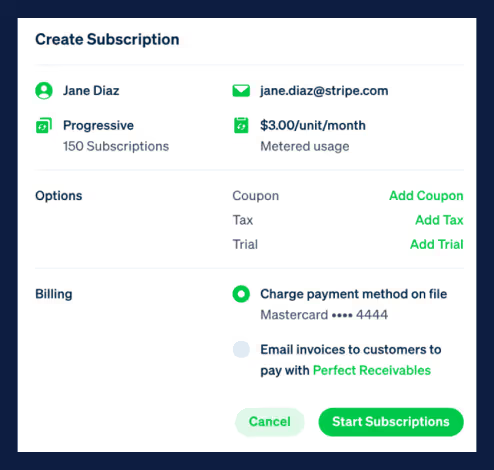
Source: Stripe Billing
Features
- Flexible subscription models: Supports flat-rate, tiered, volume, and usage-based pricing
- Developer-friendly APIs: Well-documented APIs for custom billing workflows
- Global payment processing: Multi-currency support with 135+ currencies and localized payment methods
- Automated invoicing: Generates and sends invoices based on billing cycles
- Smart payment retries: Automated dunning management to reduce churn
- Usage metering: Track customer usage in real-time with Stripe's Meters API
- Tax automation: Stripe Tax handles sales tax, VAT, and GST calculations
- Subscription management: Handle upgrades, downgrades, and proration
- Revenue recognition: Stripe Revenue Recognition supports ASC 606/IFRS 15 compliance (separate add-on)
Pros
- Seamless integration with Stripe's payment infrastructure
- Highly customizable through developer-friendly APIs
- Global payment support with 135+ currencies
- Fast, scalable setup for tech-savvy teams
- Transparent pay-as-you-go pricing (2.9% + $0.30 per transaction)
- Strong security with PCI compliance built in
Cons
- Requires engineering bandwidth for setup and ongoing maintenance
- Limited to 20 products per subscription (soft limit due to performance)
- Locks you into Stripe payment ecosystem exclusively
- Revenue recognition requires a separate subscription
- Limited invoice customization without custom code
- Limited analytics for financial tracking; focused on payment metrics
- Complex pricing scenarios require workarounds
Quick Comparison: Zone Billing vs Stripe Billing
6. Zuora vs Zone Billing
Zuora is an enterprise-grade subscription and revenue management platform designed for large organizations with complex recurring revenue models. As one of the pioneers in the subscription economy, Zuora offers comprehensive capabilities for subscription billing, revenue recognition, and financial management at scale.
Zuora excels in handling multi-entity operations, deep financial integrations, and complex compliance requirements. The platform supports advanced subscription lifecycle management, offers multiple payment gateway integrations, and provides sophisticated analytics for enterprise businesses.
However, Zuora's complexity comes with significant trade-offs: lengthy implementations that span 6-9 months, high costs, and a steep learning curve that requires specialized training.
The platform also operates billing and revenue recognition as separate products, creating integration challenges.
If you're evaluating more modern alternatives to Zuora, our Zuora alternatives guide explores other options.
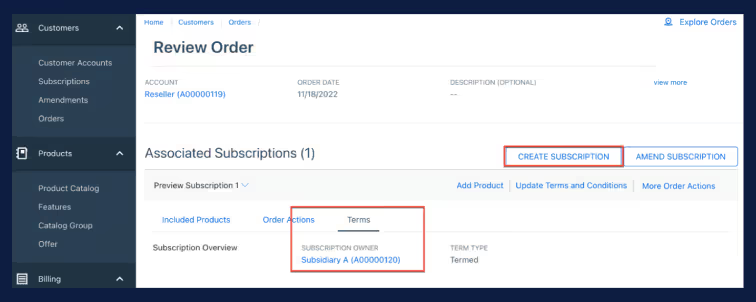
Source: Zuora
Features
- Enterprise-grade billing: Contract-based, milestone, hybrid, and multi-entity pricing models
- Multi-entity operating: Billing and compliance for organizations across different jurisdictions
- Payment gateway integrations: Supports multiple payment processors for global transaction processing
- Revenue recognition: Zuora Revenue (formerly RevPro) for ASC 606/IFRS 15 compliance with real-time visibility
- Custom analytics dashboards: 60+ pre-built reports and real-time dashboards for financial insights
- Churn management: Predictive analytics and retention workflows
- Enterprise system integrations: Connections to NetSuite, Salesforce CPQ, and major ERPs
- High transaction volumes: Built for enterprise-scale billing operations
Pros
- Enterprise-grade capabilities for complex subscription models
- Multi-entity support with sophisticated compliance automation
- Deep financial integrations with major ERPs and CRMs
- Advanced analytics with 60+ pre-built reports and predictive churn management
- Comprehensive subscription lifecycle management
- Multiple payment gateway support for global operations
- Real-time revenue visibility through Zuora Revenue dashboards
Cons
- Implementation takes 6-9 months, with external consultants
- High total cost
- Billing and revenue recognition are sold as separate products
- Usage metering requires manual Excel aggregation and custom code
- Prepaid credits require "hacky" workarounds like fictional credit notes
- Complex user interface with steep learning curve
- Invoice customization is limited without engineering workarounds
- Zuora certification and training programs add additional costs
Quick Comparison: Zone Billing vs Zuora
Scale: ~$175K/year,
Enterprise: $250K+
7. Sage Intacct vs Zone Billing
Sage Intacct is a comprehensive financial management platform that goes beyond billing to offer full ERP-level capabilities. Unlike specialized billing platforms, Sage Intacct provides a complete suite of financial tools, including general ledger, accounts payable, accounts receivable, recurring billing, revenue recognition, and advanced financial reporting.
It’s designed for mid-market to enterprise companies that need deep financial controls, multi-entity consolidation, and sophisticated accounting automation. The platform supports over 500 billing scenarios.
However, Sage Intacct's broad scope and enterprise focus come with higher costs and complexity. Companies looking solely for subscription billing may find the platform offers more than they need, while the financial expertise required to leverage its full capabilities can be challenging for smaller teams.
However, Sage Intacct's broad scope and enterprise focus come with higher costs and significant complexity. For companies specifically seeking billing automation without the overhead of a full ERP suite, Zenskar offers targeted billing and revenue recognition capabilities with faster implementation (2-16 weeks), lower total cost, and no requirement for deep accounting expertise to configure pricing model.
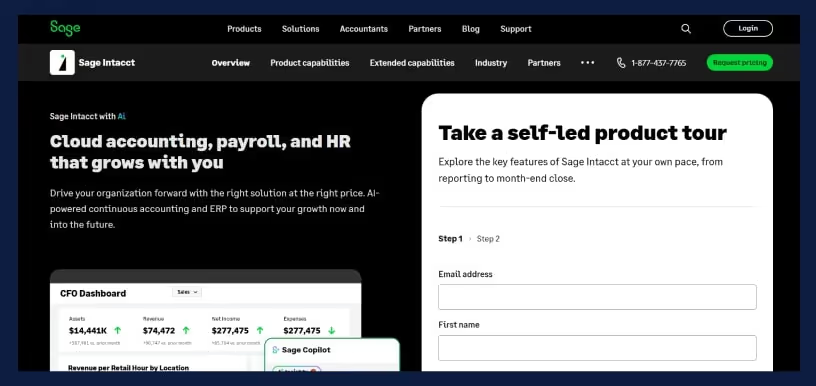
Source: Sage Intacct
Features
- Support 500+ billing scenarios: SaaS subscriptions, project-based billing, usage-based, and complex recurring models
- Automate revenue recognition: Built-in ASC 606/IFRS 15 compliance with automated workflows and templates
- Advanced financial reporting: Real-time analytics, cash flow management, and forecasting capabilities
- Multi-entity consolidation: Handle complex corporate structures with automated consolidation
- Real-time Salesforce integration: Efficient contract and customer management integration
- Multi-jurisdiction tax handling: Automated tax calculations for global billing operations
- Complete general ledger operations: Full accounting suite with powerful financial controls
- Cloud-based scalability: Flexible APIs for integrations and enterprise scalability
- Third-party billing integration: Automate revenue recognition for invoices from external billing platforms like Zenskar
Pros
- Complete financial suite beyond just billing and revenue recognition
- Scales with growth, ideal for multi-entity operations and complex pricing
- Cloud-based with flexible APIs for seamless integrations
- Implementation typically takes 90 days (~3 months) with certified partners
- Advanced financial reporting with forecasting and cash flow management
- Strong compliance automation for ASC 606/IFRS 15 with automated templates
- Multi-currency and multi-entity support built in
- Supports 500+ billing scenarios natively
Cons
- High Implementation cost: Range from $35,000 to $150,000 (125%-200% of year-one subscription)
- Requires significant financial expertise to configure and leverage fully
- Less specialized for subscription billing compared to dedicated platforms
- A broader scope may be unnecessary for companies that only need billing
- Overkill for businesses with simple subscription needs
Quick Comparison: Zone Billing vs Sage Intacct
Features to Evaluate When Choosing a Zone Billing Alternative
When evaluating alternatives to Zone Billing, look beyond surface-level features. The right platform should eliminate the constraints holding your finance team back while supporting your business as it scales. Here are the critical capabilities to prioritize:
Multi-ERP Compatibility
Your billing system shouldn't dictate your ERP strategy. Look for platforms that:
- Support multiple ERPs with bi-directional sync, NetSuite, QuickBooks, Xero, and others
- Handle journal entry automation and real-time data sync without manual reconciliation
- Allow you to add or change ERPs as your business evolves without rebuilding your billing stack
You shouldn't have to export data, reformat it, and import it again every month. Your billing platform should automatically send data to your ERP
True Entitlement Management
Stop your engineers from building entitlement infrastructure when you should be building product features. Choose a platform with native entitlement capabilities:
- Feature-level access control and automated provisioning
- Prepaid balance tracking with automatic depletion
- Usage limit enforcement with real-time alerts
- Rollover and expiration logic built in
Your product team should focus on features that drive revenue, not on maintaining billing code
Flexible Usage Metering Architecture
You shouldn't need engineers to modify your product database just to add billing identifiers that don't belong there in the first place.
Look for platforms with:
- Native connectors to your databases, warehouses, and data sources
- Decoupled usage ingestion that accepts raw data without pricing IDs or contract identifiers
- High-volume usage handling (100,000+ events/second) without rate limits
Comprehensive Revenue Recognition
Basic AR and deferred revenue aren't enough to scale.
Your platform should support all revenue methods, including sales-based, percent complete, cost recovery, and more. And handle all customer-related accounts:
- AR, revenue, unbilled revenue, deferred revenue
- Payment gateway expenses and receivables
- Gateway payouts and sales tax payables
- Customer wallet liabilities
When contracts change mid-period, revenue should adjust automatically. When you need to correct a prior period, the system should handle it, not you.
No-Code Pricing Configuration
Finance teams should configure pricing without engineering tickets. Look for platforms that support all modern pricing models through a visual interface:
- Hybrid pricing
- 2D/matrix pricing
- Tiered and volume pricing
- Conditional discounts
- Prepaid with overages
Your finance team should experiment with pricing models, launch new packages, and respond to competitive pressure quickly, without waiting weeks for engineering.
When sales asks, "Can we do this deal?" your answer should be "Yes, I can set it up today," not "Let me check with engineering."
AI-Powered Automation
Every vendor claims to have "AI," but most simply wrap ChatGPT around their existing product. That's not what you need.
Look for genuine AI automation that eliminates manual work:
- Contract ingestion from PDFs that extracts terms and sets up billing automatically
- Proactive alerts for usage anomalies, revenue trends, collection issues, and churn risks
- Embedded conversational assistance for navigation and troubleshooting—right in the platform
- Automation of routine tasks: invoice corrections, credit notes, payment updates, customer changes
AI should handle the repetitive work that keeps you in the office until 9 PM. Your team should focus on strategic analysis, not data entry and manual processes.
Native Analytics and Reporting
You shouldn't wait for the BI team to build dashboards for the questions your CEO asks every week.
Choose platforms with self-serve dashboards built in:
- Out-of-the-box SaaS metrics (ARR, MRR, churn, revenue waterfall, DSO) available immediately
- Simple UI for building unlimited custom reports—no SQL required
- Real-time drill-down by customer, product, region, or custom segments
- Answers in seconds, not days
When your board asks about revenue trends or customer retention, you should pull up the dashboard and show them, right there in the meeting. That's what native analytics means.
Fast Implementation
Your business shouldn’t wait 6-9 months for billing. You can't dedicate your entire engineering team to implementation for two quarters.
And you definitely can't keep paying consultants at $300/hour to make it work.
Look for platforms that go live in weeks, not months:
- Minimal developer overhead and engineering involvement
- Guided onboarding with clear milestones and transparent timelines
- White-glove implementation teams that act as an extension of your finance team
- Migration support that handles the heavy lifting
Time to value should be measured in weeks, not quarters. You should see ROI from day one, not after a year of setup.
Customer Self-Service Portal
Every time a customer emails asking, "What's my current balance?" or "Can I upgrade my plan?" that's a support ticket your team has to handle.
Every payment method update requires back-and-forth. Every invoice question pulls someone away from strategic work.
Find a tool that includes a fully customizable, branded portal:
- View contracts, invoices, balances, and payment history
- Make payments and update payment methods securely
- Upgrade plans, purchase credits, and adjust subscriptions
- Track usage in real-time and monitor entitlement limits
Your customers get autonomy and instant answers. Your team gets time back. Everyone wins.
The bottom line, when evaluating Zone Billing alternatives, prioritize solutions that eliminate your current constraints and provide the flexibility to grow. The right billing platform should empower your finance and product teams rather than becoming a technical bottleneck.
Ask yourself:
- Will this platform let us move faster, or will it create new dependencies?
- Will it eliminate manual work, or just shift it somewhere else?
- Will we spend less time on billing operations and more time on strategic finance?
Those questions will guide you to the right choice.
Why Zenskar Stands Out as the Top Zone Billing Alternative
While many alternatives check a few boxes, most force you to choose between flexibility and simplicity. Zenskar delivers both.
- Multi-ERP freedom: Support for NetSuite, QuickBooks, Xero, and more with bi-directional sync. Run multiple entities on different ERPs under one login without rebuilding integrations.
- Engineer-free pricing: Finance teams configure any pricing model through a visual interface. Launch experiments in minutes, handle edge cases without code.
- Native entitlements: Complete access control, prepaid balance management, and usage limits with real-time enforcement. No custom code required.
- Scalable usage metering: 200+ native connectors accept raw usage data. Zenskar automatically maps it to customers and contracts. Handle 100,000+ events/second.
- Unified revenue recognition: All accounts in one system with automated ASC 606/IFRS 15 compliance. Month-end close in hours, not days.
- AI that works: Contracts AI ingests PDFs automatically. Analytics AI generates reports from natural language. Operations AI handles routine tasks. 24/7 embedded support.
Don't believe us? Read the case studies from finance teams who made the switch to Zenskar.
Ready to eliminate engineering dependencies and automate your billing operations? Book a demo with Zenskar or take an interactive product tour to see how we automate billing and revenue recognition for modern pricing models.
Frequently asked questions
ZoneBilling handles basic usage but relies on NetSuite-native metering, lacking real-time support and requiring engineering for complex aggregation - usage-first platforms like Zenskar offer native real-time metering via 200+ connectors.
Yes, most connect via APIs and iPaaS tools, though ZoneBilling has a native SuiteApp advantage; Zenskar provides bi-directional sync without ERP lock-in.
Zenskar offers no-code pricing for hybrid/usage models, true entitlement management, and AI automation for month-end close, freeing finance teams from spreadsheets and engineer tickets.
Zone Billing is often self-serve but can take months due to custom engineering; alternatives like Zenskar go live in 6-12 weeks with guided support.
No, it lacks native support for prepaid credits or usage limits, requiring custom engineering; Zenskar provides built-in feature-level access and automated overage management.
Grow your subscriptions without limits
Don't let another dollar slip through the cracks.
